
Spectra Review

With more than 700,000 people using it and new users joining every day, Spectra is a fantastic visual page builder for WordPress. It makes creating and customizing websites quick and easy. Even with no-coding experience, you can use it without any hassle, and it works fast.Plus, it offers lots of stunning features, all at a very reasonable price.


Overview of Spectra as a WordPress Plugin
Spectra stands out in the WordPress page builder market due to its unique features and user-friendly interface. It differentiates itself from other page builders with its focus on versatility and performance.
Understanding Spectra’s Place in the Page Builder Market
Spectra has carved a niche in the WordPress ecosystem by offering a robust set of tools for building websites. Unlike some competitors, Spectra combines ease of use with powerful customization options. This makes it suitable for both beginners and seasoned web developers.
With Spectra, you benefit from a wide range of pre-built templates and modules. These modules can be easily customized, providing flexibility for various design needs. Spectra’s intuitive drag-and-drop interface further simplifies the design process, reducing the time and effort required to build a website.
Another key aspect is Spectra’s compatibility with numerous WordPress themes and plugins, ensuring seamless integration. This compatibility extends to SEO optimization features, enhancing your website’s visibility on search engines.
Comparison With Other Page Builders
When evaluating Spectra against other page builders, several factors come into play. Spectra excels in its lightweight design, ensuring faster load times and improved site performance. This can be a critical factor for maintaining visitor engagement and search engine rankings.
In comparison, some other page builders may offer more extensive libraries of templates and elements. However, these can come with a steeper learning curve or slower performance. Spectra aims to balance feature richness with simplicity, providing an optimal user experience.
Pricing is another consideration. Spectra offers competitive pricing options, often more affordable than premium page builders. This makes it an attractive option for users looking to achieve professional results without breaking the bank.
Ensuring your WordPress site is visually appealing and functional can be significantly enhanced by choosing the right page builder. Spectra is designed to meet these needs effectively.
Installing Spectra
Installing Spectra involves a straightforward process, ensuring you smoothly integrate it with your WordPress site. You’ll find the steps for initial setup and configuration simple, along with instructions to seamlessly integrate Spectra into your WordPress environment.
Initial Setup and Configuration
- Download and Install Spectra: Head to the official Spectra website or WordPress plugin repository. Click on the download button, and then upload the plugin to your WordPress dashboard.
- Activate the Plugin: Once uploaded, navigate to the ‘Plugins’ section in your WordPress dashboard and click ‘Activate’ under Spectra.
- Configuration Start: Upon activation, a setup wizard initiates, guiding you through the basics. This wizard simplifies the process, asking for key details of your website preferences.
- Customizing Settings: After the wizard completes, access the Spectra settings from your dashboard. Here, you can customize various aspects such as color schemes, layout preferences, and predefined templates.
- Essential Add-ons: Consider adding useful widgets and extensions that come with Spectra to enhance your website’s functionality. These can usually be activated with a single click within the plugin settings.
Integration with WordPress
- Compatibility Check: Spectra is designed to integrate seamlessly with most WordPress themes. Ensure your current theme supports this plugin to avoid any compatibility issues.
- Linking Pages: Use the WordPress ‘Pages’ section to add or edit pages with Spectra. Open a page and you’ll find additional options to edit with Spectra, making it easy to apply Spectra’s features directly.
- Drag-and-Drop Interface: Experiencing the intuitive drag-and-drop interface makes building and customizing pages easier. You can add rows, columns, and other elements simply by dragging them into place.
- Live Previews: Spectra offers real-time previews within the WordPress dashboard. This feature allows you to see changes immediately, helping you create pages more efficiently and detect potential issues quickly.
- User Roles Integration: Depending on your WordPress setup, Spectra respects user roles and permissions. This ensures only authorized users can make significant changes to the site layout and design.
Adding Spectra to your WordPress site is a practical way to enhance its appearance and functionality with minimal effort.
Exploring the User Interface
The Spectra WordPress Page Builder offers a seamless user interface with a focus on intuitive design and robust customization options. The layout is user-friendly, enabling users to quickly navigate and utilize its features.
Design and Usability
The user interface of the Spectra Page Builder is designed to be both visually appealing and highly functional. The primary dashboard is clean with easily identifiable icons, making navigation straightforward.
Drag-and-drop functionality is a standout feature, allowing you to build pages effortlessly. Widgets and elements are displayed in a side panel, which can be dragged directly into the page layout. This simplifies the design process for both beginners and advanced users.
Preview options let you see changes in real-time, ensuring that your adjustments look perfect before they go live. Shortcuts and tooltips further enhance usability, enabling a smoother workflow as you build and customize your site. The overall design emphasizes accessibility and ease of use, reducing the learning curve.
Customizing the Dashboard
Customizing the dashboard in Spectra is a straightforward process that enhances the user experience. You can tailor the layout to suit your specific needs by rearranging elements and adjusting settings from the dashboard itself.
There are multiple themes available that can change the look and feel of your entire dashboard. These themes ensure that your workspace is not only functional but also visually appealing.
User roles and permissions can be managed directly from the dashboard, providing control over who can access different features. This is particularly useful for team environments where different members play different roles in site management.
Integration options allow you to connect with third-party tools and plugins, expanding the functionality of your Spectra dashboard. This customization extends to performance settings, where you can optimize load times and resource usage to keep your site running smoothly.
Features and Functionalities
Spectra WordPress Page Builder offers a range of core building blocks and advanced features that make website creation intuitive and efficient.
Core Building Blocks
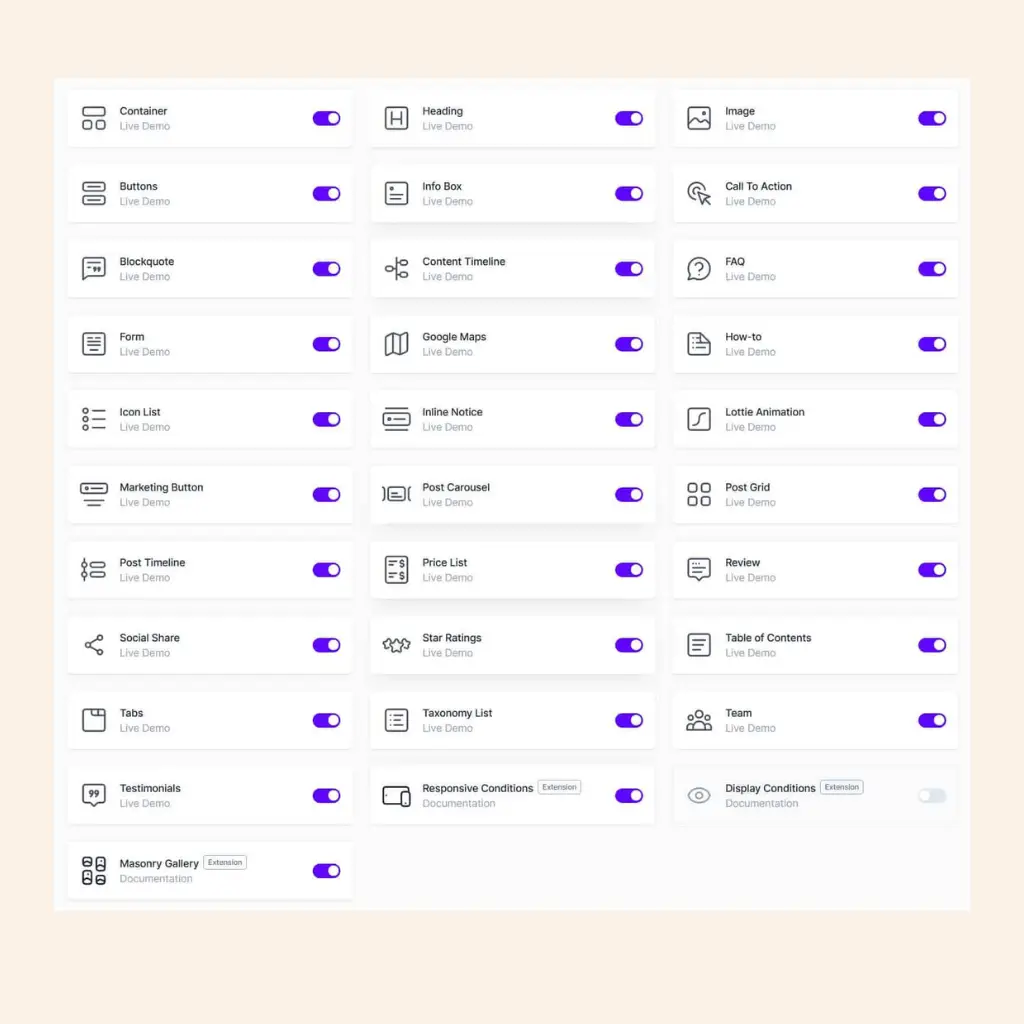
Spectra provides essential widgets such as text boxes, image holders, and buttons. These building blocks form the foundation of your webpage, allowing you to arrange content seamlessly. The drag-and-drop interface ensures you can easily move elements around without any coding knowledge.
Additional elements like galleries and video embeds enhance visual appeal. Pre-designed templates and sections save time, offering a starting point you can customize. Each block is highly configurable, with options to tweak dimensions, colors, and fonts to match your brand identity.
The real-time editing feature is crucial, showing changes immediately as you make them. This instant feedback reduces the trial-and-error process, making it simpler to achieve the desired layout and design.
Advanced Spectra Features
Spectra excels with its advanced functionalities. The responsive design ensures your website looks great on all devices, automatically adjusting layouts for mobile, tablet, and desktop views.
The SEO optimization tools integrated into Spectra help improve your search engine rankings. These tools include meta tags, alt text for images, and schema markup, which are essential for enhancing online visibility.
Custom CSS access provides flexibility for users with coding skills, allowing for further customization beyond what the default options offer. Additionally, the integrated WooCommerce support streamlines the creation of online stores, making product management and sales tracking more manageable.
Pre-built plugins and widgets extend functionality, such as contact forms, booking systems, and social media integrations. These features elevate your site from a basic webpage to a fully functional web application.
Design Capabilities of Spectra
Spectra offers versatile design capabilities, focusing on templates and blocks, along with customization options for developers, facilitating both simple and complex website design needs.
Designing with Templates and Blocks
With a library of pre-designed templates and blocks, Spectra simplifies the design process. You can choose from a variety of templates for different pages like homepages, blogs, and e-commerce sites, ensuring you find a match for your vision.
Blocks are modular and flexible. Common blocks include text, images, buttons, and forms. You can mix and match these to create customized page layouts without writing any code. This approach is ideal for creating wireframes and prototypes quickly, aiding in efficient website design.
Interactive design elements such as sliders, galleries, and testimonials further enhance functionality. Drag-and-drop features make it user-friendly, even for beginners. Reusable blocks allow you to maintain consistency throughout the site, saving time during the design process.
Customization Options for Developers
Advanced customization is available for developers through Spectra’s flexible architecture. Custom CSS and JavaScript integration enable precise control over the appearance and behavior of design elements. This is useful for those looking to go beyond standard templates and blocks.
Developers can utilize hooks and filters to modify pre-existing functions or add new ones. This level of customization ensures that you can tailor every aspect of your website to meet specific needs.
Spectra also supports custom post types and dynamic data, which facilitates the creation of complex website structures and content management systems. Compatibility with third-party plugins and themes adds further flexibility, allowing a cohesive integration with your current tech stack.
Performance and Speed
Spectra WordPress Page Builder aims to enhance both the performance and speed of your WordPress website. This includes efficient page speed optimization and minimal impact on website loading times.
Optimizing Page Speed with Spectra
By using Spectra, you can leverage various tools to optimize your page speed. Spectra focuses on clean and efficient code to reduce bloat and improve efficiency. Its modular architecture means you only load the features you need, minimizing resource usage.
Additionally, Spectra supports lazy loading for images and other media. This ensures that assets are only loaded when they come into view, decreasing initial load times. This approach directly contributes to quicker page rendering and better performance metrics.
Impact on Website Loading Times
Spectra has a positive impact on website loading times due to its lightweight design. The builder’s reliance on high-performance JavaScript frameworks promotes faster interaction times. Websites built with Spectra typically have fewer HTTP requests, thanks to the reduced need for additional plugins.
Page speed enhancements with Spectra also benefit SEO, as faster loading times tend to improve search engine rankings. Users experience quicker responses, which can lead to better engagement and lower bounce rates. Overall, Spectra helps maintain an efficient and speedy WordPress website, crucial for retaining visitors.
Spectra and Gutenberg Compatibility
Spectra integrates smoothly with the Gutenberg editor, enhancing your page-building experience with seamless functionality and a wide range of blocks.
Working with Gutenberg Editor
When you use Spectra with the Gutenberg editor, you’ll find a fluid workflow that enhances content creation. Spectra’s compatibility ensures that you can add and customize blocks without encountering glitches. You can effortlessly switch between editing and previewing, making real-time adjustments with ease.
The editor interface remains intuitive, helping you quickly locate Spectra-specific blocks. Drag-and-drop functionality is retained, maintaining Gutenberg’s user-friendly design. Even complex layouts don’t slow down performance, allowing you to build pages efficiently.
Utilizing Gutenberg Blocks
Spectra offers a variety of blocks that expand the capabilities of the Gutenberg editor. These blocks are designed to meet various design needs, from simple text and images to complex layouts. You can add testimonials, pricing tables, and advanced buttons directly from the block library.
Each block is customizable, giving you control over styles, colors, and spacing. Whether you need a call-to-action button or a custom grid layout, Spectra’s blocks integrate seamlessly with Gutenberg’s existing options. This flexibility allows you to create unique, dynamic pages without additional plugins.
Extending Functionality with Addons and Extensions
Leveraging addons and extensions can greatly enhance your Spectra WordPress page builder experience, unlocking new design possibilities and improving functionality. Below, we’ll explore some popular addons and the benefits of integrating extensions.
Popular Spectra Addons
Spectra Pro offers numerous addons that enable advanced features not available in the free version. Ultimate Addons for Gutenberg is a popular choice, providing a robust library of customizable blocks. You might use it to create more engaging layouts without extensive coding knowledge.
Spectra Advanced Blocks is another addon that helps you customize typography, colors, and other design elements. Utilize Spectra Forms to create contact forms, surveys, and data collection forms effortlessly. It’s essential to explore these addons to fully leverage the capabilities of Spectra.
Enhancing Capabilities with Extensions
Extensions can further enhance the Spectra experience by adding specialized features. Spectra Analytics helps you track user interactions and analyze site data. Integrating third-party extensions, such as SEO optimization tools, can improve your site’s search engine rankings.
E-commerce extensions, like WooCommerce compatibility, allow you to set up online stores easily. Security extensions provide robust protection against threats. Using these extensions makes your Spectra-powered site not only visually appealing but also highly functional and secure.
By integrating these extensions, you ensure a more comprehensive and versatile WordPress site.
Creating Interactive Elements
Adding interactive elements to your website can significantly enhance user engagement and improve overall user experience. Key elements like popups, call-to-action buttons, and forms are essential tools for achieving these goals.
Adding Popups and Call to Action Buttons
Using a popup builder allows you to create dynamic and engaging popups that can capture user attention. You can configure various triggers for these popups, such as time delay, scroll percentage, or exit intent, to ensure they appear at the right moment.
Call to action (CTA) buttons are crucial for guiding users towards desired actions, such as signing up for a newsletter or making a purchase. Designing effective CTAs involves strategic placement, compelling text, and bold colors to ensure they stand out on the page.
Forms and User Input Features
Forms are essential for collecting user information and enabling interactions. With Spectra, you can create custom forms for various purposes, including contact forms, surveys, and registration forms.
You can easily add fields for user input like text, email, and dropdown menus. Advanced options might include file uploads or captcha verification to enhance security and user experience.
Properly designed forms can boost interaction rates and provide valuable insights into your audience’s needs and preferences. Integrating these forms with email marketing tools can further streamline your lead generation process.
Templates and Pre-Designed Layouts
Spectra offers a robust collection of templates and premade designs, allowing you to create stunning websites effortlessly. With numerous options available, you can select and customize designs to suit your specific needs.
Exploring the Template Library
The template library in Spectra is extensive, offering various website templates and page templates. You can find layouts for different niches, such as blogs, e-commerce sites, portfolios, and business websites.
The library ensures that each template is optimized for performance and aesthetics. Templates are categorized, making browsing and selection straightforward. The library is regularly updated, providing new and trendy designs to keep your website fresh and modern.
You also get access to both free and premium templates, giving you flexibility in terms of budget and design preferences. Each template is fully responsive, ensuring your site looks great on all devices.
Customizing Premade Designs
Customizing premade designs in Spectra is a seamless process. You can modify colors, fonts, images, and layout elements with ease. The intuitive drag-and-drop interface simplifies the design process, allowing you to see changes in real-time.
Advanced customization options allow for deeper modifications, such as tweaking CSS or integrating custom scripts. Spectra supports third-party plugins, enabling you to extend the functionality of your templates as needed.
You can also save your modified templates for future use, creating a personalized library. This feature ensures that your preferred designs and customizations are always at your fingertips for new projects.
Advanced Design and Customization
Spectra WordPress Page Builder offers advanced customization options with extensive design tools. You will find in-depth techniques for personalizing your site and learn to effectively use CSS and JavaScript for further enhancements.
In-depth Customization Techniques
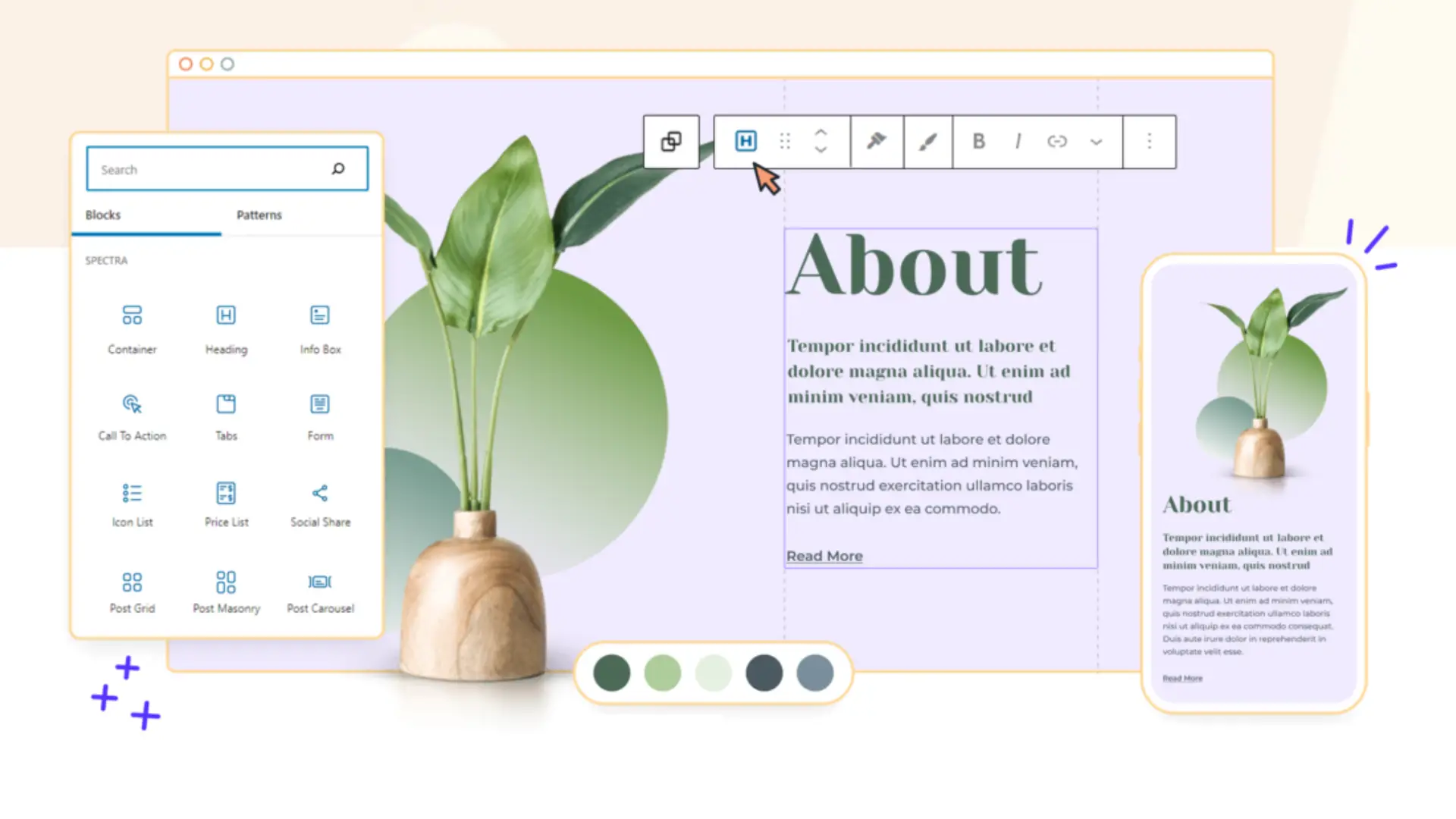
Spectra provides a range of customization options, enabling you to tailor your website’s appearance. By using the flexbox container, you can create flexible and responsive layouts.
You can adjust margins, paddings, and alignments to get the exact look you want. The drag-and-drop functionality simplifies positioning elements.
Additionally, Spectra’s library of pre-designed templates can be modified extensively to match your style. Customize fonts, colors, and backgrounds using the style settings panel. For those who want greater control, you can edit elements at a granular level, such as tweaking individual block settings.
Working with CSS and JavaScript
For more advanced users, Spectra allows the integration of custom CSS and JavaScript. You can add custom styles directly within the page builder to ensure your design is unique.
Insert CSS to adjust global elements like fonts or specific sections of your webpage, bypassing built-in customizers. JavaScript can also be included to implement interactive features or complex animations, enhancing the user experience.
By leveraging coding alongside Spectra’s tools, you can implement virtually any design feature or functionality. This flexibility makes it suitable for both novices and experienced developers aiming for sophisticated and tailored web designs.
SEO and Marketing Features
To enhance your website’s visibility and drive conversions, Spectra offers robust tools designed for optimizing content and marketing.
Optimizing Content for Search Engines
Spectra’s tools are SEO-friendly, ensuring your content meets search engine guidelines.
Key features include built-in schema markup, which helps search engines understand your content better. This can lead to richer results in search engine listings.
You also get options for crafting SEO-friendly URLs and meta descriptions, allowing you to better target your audience. The platform’s intuitive interface makes it easy to implement alt text for images, further boosting your SEO efforts.
Marketing and Conversion Tools
For marketing, Spectra provides tools that facilitate better conversion rates. It includes lead capture forms to grow your email list and integrate seamlessly with popular email marketing services.
You can utilize call-to-action (CTA) buttons that are highly customizable, allowing you to drive specific user actions.
Additionally, Spectra features A/B testing tools, so you can measure the effectiveness of different campaigns and optimize your strategies. Integrations with Google Analytics let you track important metrics, providing insights into user behavior and campaign performance.
User Experience and Accessibility
Spectra WordPress Page Builder emphasizes a user-friendly experience and ensures responsive designs. These features cater to a broad audience, including those needing accessible and mobile-friendly websites.
Creating a User-Friendly Experience
When designing with Spectra, you will find an intuitive interface that simplifies page building. The drag-and-drop functionality allows you to quickly add and arrange elements. This ease of use reduces the learning curve, enabling you to focus on creativity rather than technical skills.
Spectra also offers a variety of pre-built templates. These templates can be customized to fit your brand, minimizing the time spent on design work. Additionally, the real-time preview feature helps you see changes instantly, ensuring your layout looks exactly as intended before publishing.
Ensuring Responsive Designs
Ensuring your website looks great on all devices is crucial. Spectra provides built-in tools for creating responsive designs. You can easily adjust settings for different screen sizes, ensuring your site performs well on desktops, tablets, and smartphones.
You have control over specific elements, such as text size and image scaling, for different devices. This flexibility helps you create a consistent user experience, regardless of how visitors access your site. Accessibility features, like keyboard navigation, also contribute to making your site usable for everyone.
Pricing and Value for Money
Spectra WordPress Page Builder offers a structured pricing model that caters to different needs and budgets. You’ll find options that range from a robust free version to an enhanced Pro Version, each providing varying levels of functionality and value.
Understanding Spectra’s Pricing Structure
Spectra’s pricing structure is designed to be straightforward. There are two main options: the free version and the Pro Version. The free version provides basic features at no cost, which is ideal for small websites or individuals starting out.
For more advanced features, Spectra offers the Pro Version. Pricing for the Pro Version is available in different plans, typically structured in annual subscriptions. Common plans include:
| Plan Type | Cost | Features |
|---|---|---|
| Basic | $59/year | Advanced modules, priority support, updates |
| Professional | $89/year | All Basic features, additional templates, premium addons |
| Agency | $149/year | All Pro features, multiple site licenses, exclusive support |
These plans are designed to scale with your needs, making it easier to choose one that fits your budget and requirements.
Comparing Free vs. Pro Version
The free version of Spectra comes with a host of essential tools. You’ll get access to basic modules and pre-built templates, which might be sufficient for a simple website. However, it lacks some of the advanced customization options available in the Pro Version.
The Pro Version, on the other hand, unlocks a wide array of premium features. These include additional design modules, more pre-built templates, and enhanced customer support. The Pro Version also often receives faster updates and exclusive content.
Here’s a quick comparison:
Free Version:
- Essential modules
- Basic support
- Limited templates
Pro Version:
- Advanced modules
- Priority support
- Extensive template library
- More frequent updates
This comparison highlights the additional value you receive with the Pro Version, making it suitable for professional websites or businesses looking for more robust functionality.
Spectra | Pros & Cons
Spectra WordPress Page Builder is a powerful and versatile tool that simplifies the website creation process, making it an excellent choice for users looking to build beautiful, responsive sites with ease.
Pros
Cons
Spectra Review | Our Take
WhIf you’re looking to create a stunning website without the hassle of coding, Spectra WordPress Page Builder is an excellent choice that can elevate your web design experience. With its user-friendly drag-and-drop interface, Spectra allows anyone, from beginners to seasoned developers, to craft beautiful and functional pages effortlessly. The intuitive design makes it easy to navigate, enabling users to focus on their creativity rather than getting bogged down by technical details.
One of the standout features of Spectra is its extensive library of pre-built templates and customizable blocks. These professionally designed options provide a solid foundation for your website, allowing you to get started quickly while still maintaining a unique look that reflects your brand. Whether you’re building a personal blog, an e-commerce site, or a portfolio, Spectra has the tools you need to create a visually appealing and cohesive online presence.
Performance is another area where Spectra shines. The page builder is lightweight and optimized for speed, ensuring that your website loads quickly and efficiently. This is crucial not only for providing a great user experience but also for improving your site’s SEO rankings. Additionally, all pages created with Spectra are fully responsive, meaning they will look fantastic on any device, from desktops to smartphones, making your content accessible to a broader audience.
Lastly, Spectra is continually updated with new features and improvements, demonstrating a commitment to enhancing user experience. With responsive customer support readily available, users can quickly resolve any issues that may arise, ensuring a smooth building process. Overall, Spectra WordPress Page Builder combines ease of use, versatility, and performance, making it a fantastic option for anyone looking to build a professional website without the stress. Dive in and discover how Spectra can help you bring your vision to life!
Spectra Review | FAQs
What are the strengths of Spectra compared to other page builders?
Spectra excels in its versatility and extensive range of design options. It includes pre-designed templates and blocks, making it easy to create professional-quality pages. Its seamless integration with other WordPress plugins also sets it apart from many competitors.
How user-friendly is Spectra’s interface for beginners?
Spectra is designed with a clean, intuitive interface that is accessible even to those new to page building. Drag-and-drop functionality, along with ample tutorials and documentation, ensures that novices can quickly get up to speed.
What additional features does Spectra Pro offer over the free version?
Spectra Pro includes advanced design modules, premium templates, and enhanced customization options. Users also gain access to priority support and regular updates, which can significantly enhance website functionality and aesthetics.
Can Spectra page builder support large-scale, complex website designs?
Yes, Spectra is capable of handling large-scale projects. It offers advanced layout and design options, including responsive design capabilities, that cater to complex website structures typically needed for larger businesses or extensive content sites.
What is the performance impact of using Spectra on site speed and loading times?
Spectra is optimized to minimize its footprint on loading times. Efficient coding practices and optimized asset delivery help ensure that the page builder does not significantly slow down your website.
How does the community rate Spectra’s customer support and updates?
The community generally rates Spectra’s customer support highly, appreciating the fast response times and helpful staff. Regular updates are provided to enhance functionality and security, which maintains positive feedback from users.
Related Articles & Blog Posts

Email Marketing & Funnels for Beginners: Learn how to build an email list, nurture trust and create sustainable online income
Latest Blog Posts
Email Marketing & Funnels for Beginners: Learn how to build an email list, nurture trust and create sustainable online income

You probably think you feel stuck because you don’t know enough. I used to believe the same thing. When I first started

You’ve probably heard that building online income requires multiple income streams. Maybe you’ve seen people talking about affiliate marketing, blogging, YouTube,
