
Nifty Review

Nifty is an all-in-one project management tool that stands out with its intuitive user interface, seamless collaboration features, and robust time-tracking capabilities. Designed to streamline workflows and enhance productivity, Nifty ensures that you and your team stay organized and on track. Whether you’re managing a small project or coordinating a large team, Nifty’s comprehensive suite of tools makes project management a breeze.

Are you tired of juggling multiple tools to keep your projects on track?
Enter Nifty, the all-in-one project management solution designed to simplify your workflow and boost productivity. With its user-friendly interface, powerful collaboration features, and comprehensive time-tracking capabilities, Nifty promises to transform the way you manage your tasks.
But does it really live up to the hype? Read on to discover how Nifty can revolutionize your project management experience.
Nifty is a powerful tool that can transform how you manage projects and collaborate with your team. Designed with a range of features to streamline workflows, it promises to boost productivity and enhance communication.
You will find its project management software ideal for keeping track of tasks, deadlines, and team responsibilities. Integrated collaboration tools help in real-time communication, making it easier to keep everyone on the same page.
From planning to execution, Nifty covers all aspects of project management. The intuitive interface ensures a quick learning curve, allowing you to focus more on your projects and less on figuring out how to use the tool.
Overview of Nifty
Nifty streamlines project management with a focus on robust collaboration features and an intuitive interface. Ideal for teams looking to enhance productivity and transparency.
Key Features
Nifty offers milestone-driven project management, which helps in breaking down tasks into manageable parts. This ensures every team member knows their responsibilities.
The time tracking feature allows you to monitor the time spent on different tasks. This is particularly useful for billing and productivity analysis.
File sharing is seamless, allowing you to upload, store, and manage project-related files in one place. You can easily attach files to tasks, discussions, and projects.
Collaboration tools such as group chat, comments, and direct messaging keep your team connected. Integrations with tools like Slack and Zoom further enhance communication.
Custom task boards allow you to create workflows that best suit your team’s needs. With features like drag-and-drop, it’s easy to categorize and prioritize tasks.
With Nifty, you get a unified workspace that combines project management and team collaboration. This blend minimizes the need for multiple tools and streamlines your workflow.
Imagine managing projects where all communications, files, and tasks are centralized. Nifty not only simplifies this process but enhances visibility and accountability.
The user-friendly interface ensures that even those new to project management tools can get up to speed quickly. Features like timeline views and automated reporting save you time and reduce manual tracking.
Overall, Nifty is designed to help you and your team focus on what matters most: delivering successful projects efficiently.
User Interface and Experience
The platform offers a highly customizable interface, allowing users to tailor their experience to their specific needs. Navigating through the various features is straightforward and intuitive.
Dashboard Customization
Nifty’s dashboard is designed for flexibility. You can personalize widgets, rearrange layouts, and choose what data to display. This means you can prioritize your most critical tasks and data points.
The mobile app maintains similar customization options, ensuring consistency across devices.
A standout feature is the ability to create multiple dashboards. This is particularly useful if you manage various projects or teams and need distinct views for each.
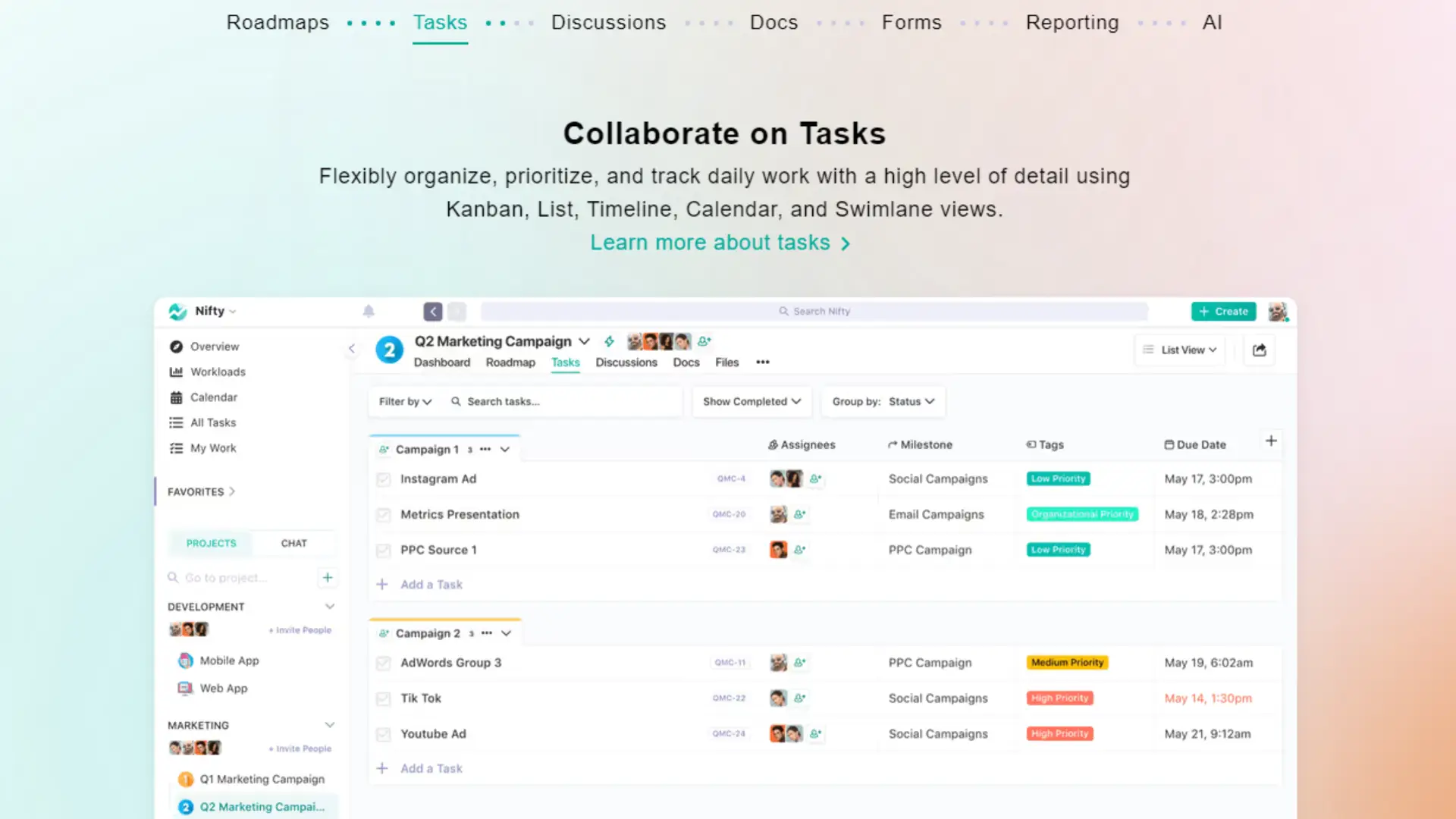
Additionally, you can switch between a list view and other formats, making it easier to manage your workflow in a way that suits you best.
Ease of Navigation
Navigating through Nifty is simple and user-friendly. The interface is clean, with a clear hierarchy that makes finding and accessing features quick.
Key functions are easily accessible from the main menu.
The mobile app complements the desktop experience, with intuitive gestures and a layout optimized for smaller screens.
Search functionality is robust, allowing you to locate tasks, messages, and files efficiently.
You can effortlessly jump between projects and categories, thanks to a logical and streamlined design.
Setting Up Your Account
Setting up your Nifty account involves creating your profile and assigning roles with suitable permissions to ensure seamless team collaboration, especially if you’re leveraging the Enterprise Plan.
Account Creation
To get started, first visit Nifty’s website and click on the “Sign Up” button. You’ll be prompted to enter your email address and create a password. After verifying your email, you’ll need to provide additional details such as your name and company information.
Once your account is created, it’s crucial to set up your profile. This includes uploading a profile picture and filling out your contact information. Personalizing your profile helps team members quickly identify you, fostering smoother interactions.
For those on the Enterprise Plan, additional setup options such as Single Sign-On (SSO) integration and advanced security settings will be available. These options provide enhanced security and streamlined login processes for larger teams.
User Roles and Permissions
Assigning roles and permissions is essential to managing team dynamics effectively. Nifty allows you to categorize users into roles such as Admin, Project Manager, and Team Member. Each role comes with predefined permissions that dictate the level of access and control a user has.
Admins have the highest level of control, including the ability to manage settings, add or remove users, and oversee all projects. Project Managers can create and manage projects and tasks but may not have access to administrative settings.
Team Members can participate in projects and tasks as assigned, with limited ability to make structural changes. Leveraging these roles ensures that information is appropriately segregated and managed.
In an Enterprise Plan scenario, user roles and permissions can be further customized for intricate team collaboration needs, making it suitable for large organizations with extensive hierarchies.
Project Management Capabilities
Effective project management is crucial for achieving your project goals. Key features include efficient task management, milestone tracking, and visual tools for progress oversight.
Kanban and List Management
Kanban boards and lists provide a structured approach to task management. They allow you to organize tasks into columns representing different stages of progress. This visual method helps you track what needs to be done, what’s in progress, and what has been completed.
Kanban boards often use cards that can be moved between columns. These cards can contain detailed information, such as descriptions, deadlines, assigned team members, and priority levels. This method enhances transparency and accountability within your team.
Lists offer a simpler alternative to Kanban. Tasks are displayed in a linear fashion, which can be ideal for smaller projects or when you need a quick overview of your to-do items. Using these tools effectively can streamline your task management processes and ensure that your projects stay on track.
Gantt Charts and Timeline Tracking
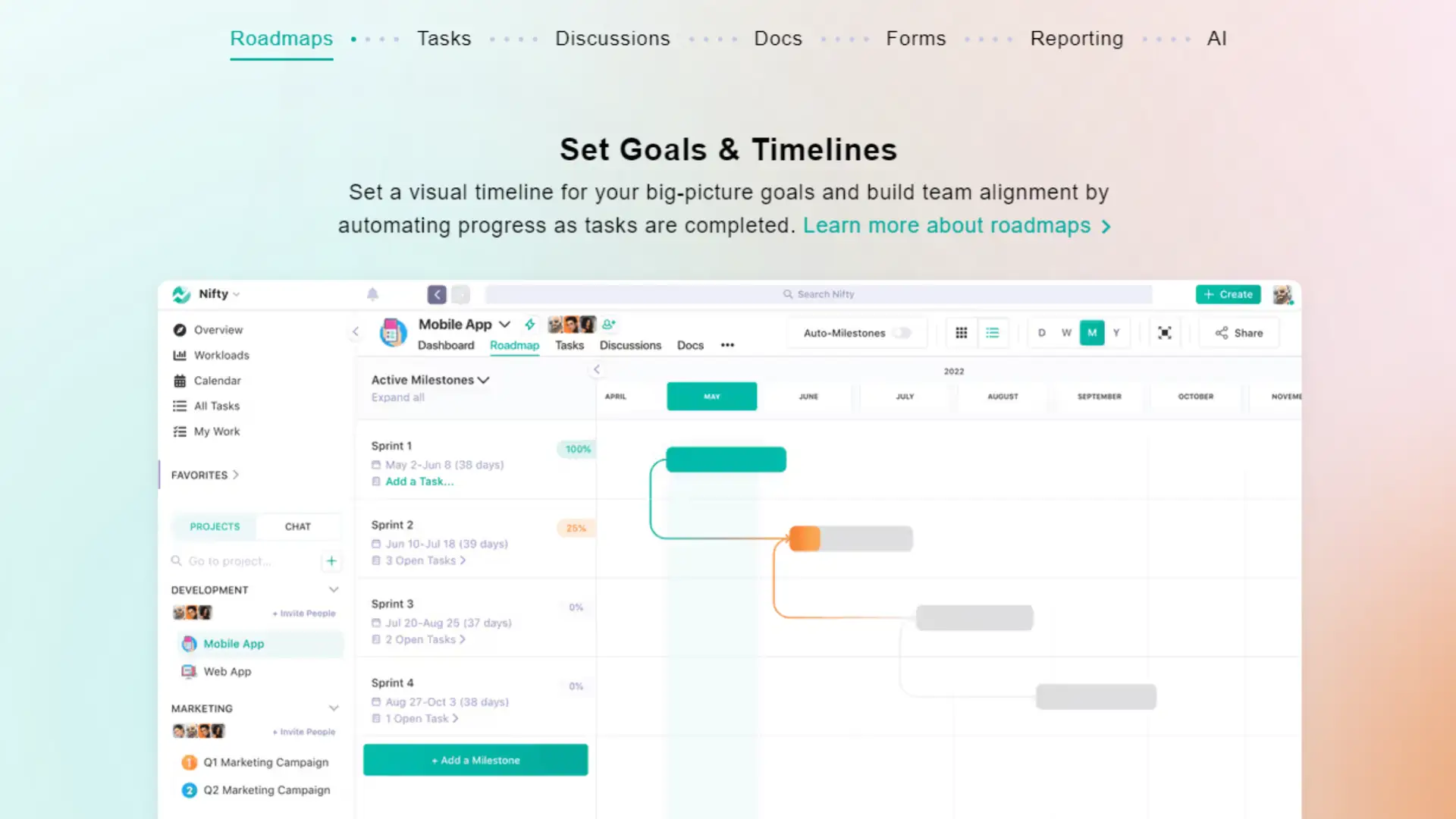
Gantt charts are another invaluable tool in project management. They provide a chronological view of your project timeline, allowing you to visualize the sequence and duration of tasks. Each task is represented as a bar, indicating its start and end dates across a calendar.
With Gantt charts, you can easily identify dependencies between tasks and understand how delays in one area might impact the overall project schedule. This helps in proactively managing risks and maintaining momentum towards achieving your milestones.
Timeline tracking complements Gantt charts by offering a broader view of project progress. It enables you to monitor key milestones and ensure that you’re meeting important deadlines. Regularly reviewing your timeline can help you make adjustments as needed and keep the project aligned with its objectives.
Using both Gantt charts and timeline tracking, you can gain a comprehensive view of your project’s progress and make informed decisions to keep everything running smoothly.
Enhancing Team Collaboration
Enhancing team collaboration involves improving communication and facilitating efficient file sharing and discussions. The following features of Nifty provide practical tools for effective teamwork.
Communication Features
Effective communication is critical for team collaboration. Nifty offers several features designed to enhance team interactions. Real-time chat facilitates instant communication among team members, ensuring quick responses and continuous conversation. Additionally, task comments allow you to discuss specific assignments directly within the task, keeping all relevant discussions centralized and easily accessible.
Video conferencing and voice calls are integrated into Nifty, enabling face-to-face interactions and more in-depth discussions. These tools help bridge the gap created by remote work, fostering a sense of connectivity among team members. Notifications ensure you stay updated on all important conversations, reducing the risk of missing critical information.
File Sharing and Discussions
File sharing is streamlined with Nifty, making it easy to distribute and discuss documents within the team. You can upload various file types directly into tasks and projects, promoting easy reference and collaboration. This feature ensures all essential files are stored in a single, organized location.
Document collaboration allows multiple team members to edit shared files simultaneously, promoting a more interactive and efficient workflow. Further, discussion threads within tasks and projects provide a space for focused dialogue about specific files or topics. This helps to keep all discussions relevant and centralized, ensuring clarity and coherence in collaborative efforts.
Integrations and Ecosystem
Nifty offers a broad range of integrations, allowing seamless workflows and productivity enhancements. You can connect with both native integrations and external tools to optimize your work environment.
Native Integrations
Nifty’s native integrations ensure direct and efficient connections with commonly used tools. Slack integration facilitates real-time communication, enhancing team collaboration by bringing project updates directly into your chat channels.
Nifty also integrates with Zoom, enabling you to schedule and join meetings without leaving the platform. This streamlines communication and planning, making remote collaboration smoother.
For development teams, Nifty links with GitHub, providing instant access to repositories and issue tracking. This helps keep your project management and code development in sync.
Furthermore, integrating with Google Drive allows direct access to your files and documents. You can attach, share, and collaborate on files without navigating away from your project space.
Connection with External Tools
Through Nifty’s connection with Zapier, you can automate tasks and enhance connectivity with over 2,000 apps. Zapier acts as a bridge, enabling workflows that otherwise require manual transfer of information.
For instance, you can create Zaps to push updates from Nifty to other project management tools or vice-versa. This minimizes the need for repetitive data entry.
Nifty’s ability to integrate with a broad ecosystem of applications ensures that your tools communicate effectively. It’s a centralized hub that connects with your preferred apps, allowing you to curate a tailored workflow.
These connections expand functionality and create a cohesive digital workspace, reducing friction and enhancing productivity across your team.
Reporting and Insights
Nifty offers essential tools for capturing project and time-related data. Understand how to leverage these features to optimize your workflow.
Project Insights
Project Insights provide crucial data to measure the performance and progress of your projects. Utilize the dashboard for a visual representation of key metrics.
Key Metrics:
- Task completion rates
- Milestones achieved
- Team productivity
These metrics help you stay on top of project timelines and identify any bottlenecks early. Customizable reports can be generated to analyze specific areas of interest, allowing precise adjustments and better resource allocation.
Time Reporting and Tracking
Accurate time tracking is essential for billing and productivity assessment. Nifty enables you to log hours spent on tasks directly within the app.
Features:
- Automated time logs
- Manual time entry
- Time tracking reports
These tools ensure that all time spent is accounted for, improving both transparency and efficiency. Insightful time tracking reports provide a clear view of how resources are utilized, making it easier to manage workloads and deadlines effectively.
Customization and Flexibility
Nifty provides a wide array of customization options that enhance workflow automation and offer flexibility in creating custom views and fields that suit various needs.
Workflow Automation
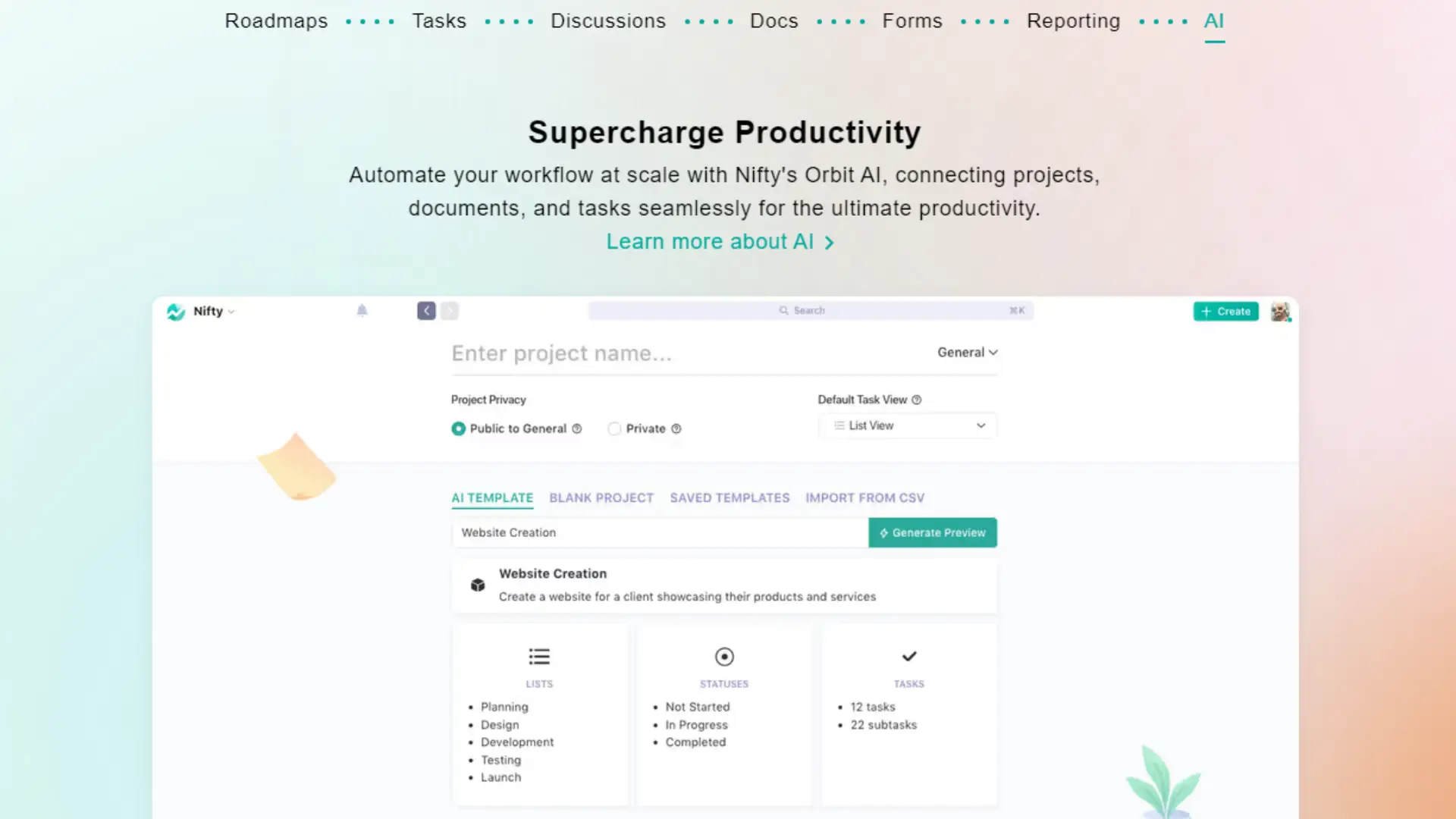
Workflow automation in Nifty allows you to streamline repetitive tasks, saving both time and effort. By using Custom Automation, you can set up triggers and actions to automate routine processes.
For example, you can automate task assignments when specific criteria are met. This ensures tasks are automatically distributed to team members based on pre-defined rules.
Integrations with third-party apps further augment these capabilities, enabling a more seamless workflow. Moreover, features like Kanban Boards and Swimlane View can be customized to reflect unique stages of your projects, enhancing clarity and efficiency.
Custom Views and Fields
Nifty’s ability to create custom views and fields provides a tailored approach to project management. Custom views allow you to display tasks and projects in a way that best suits your requirements.
You can use different views like Kanban Boards or list views to organize tasks by priority, due date, or assignee. Custom fields can also be added to track additional data points such as budgets, timelines, or any specialized metrics.
These customizations enable a more personalized and precise management experience, ensuring that all necessary information is easily accessible and organized. This flexibility is crucial for adapting Nifty to diverse project methodologies and business needs.
Pricing and Plans
Nifty offers a variety of plans tailored to different user needs, from a Free Plan to several Paid Plans. We’ll compare these plans and analyze their cost-efficiency to help you determine which option best suits your requirements.
Comparing Different Plans
Nifty provides multiple plans: the Free Plan, Starter Plan, and Business Plan.
- Free Plan: This plan is ideal if you’re just getting started. It includes basic features and limits on users and projects.
- Starter Plan: Suitable for small teams, offering more advanced features, increased storage, and higher user limits.
- Business Plan: Designed for larger organizations with extensive needs. It provides unlimited everything and premium support.
Each plan scales in price and features, ensuring you can upgrade as your needs grow.
Assessing Cost-Efficiency
The cost-efficiency of Nifty’s plans varies based on your usage and team size.
- For budget-conscious users, the Free Plan delivers essential tools without any cost, suitable for individuals or small projects.
- The Starter Plan balances additional features and cost, aiming to enhance team productivity at a reasonable price point.
- The Business Plan might seem costly initially, but it proves efficient for large teams requiring extensive toolsets and support.
Evaluating your team’s needs and project scope is critical to justify the investment in a higher-tier plan.
Client and External Collaboration
Effective client collaboration enhances project outcomes and trust. Crucial aspects include managing client roles and maintaining appropriate client access and permissions.
Managing Client Roles
Properly defining and managing client roles is essential for streamlined workflows. You should assign roles such as viewer, editor, or admin based on the client’s involvement and needs.
In a collaborative workspace, clear role definitions prevent unauthorized actions and reduce decision-making time. Public and private project settings help manage who can see and interact with sensitive information.
Use tools that support role-based permissions to maintain control. Regularly review and update roles to adapt to changing project requirements.
Client Access and Permissions
Client access levels should be tailored to ensure security and efficiency. Permissions determine what a client can view or modify, protecting confidential data while allowing necessary collaboration.
Private projects require more restrictive permissions to safeguard sensitive information. Public projects might have more relaxed settings but still need controls to prevent misuse.
Implement access policies that balance transparency with security. Keep clients informed about their access levels and any changes to permissions. Employing these practices ensures effective and secure client interactions.
Project Planning and Organization
Efficient project planning and organization lead to more predictable outcomes and better resource management. You need to track milestones and manage portfolios effectively.
Milestone Tracking
Tracking project milestones ensures you stay on schedule and meet key deadlines. Use a visual roadmap to chart out significant events and tasks. This helps in identifying potential bottlenecks.
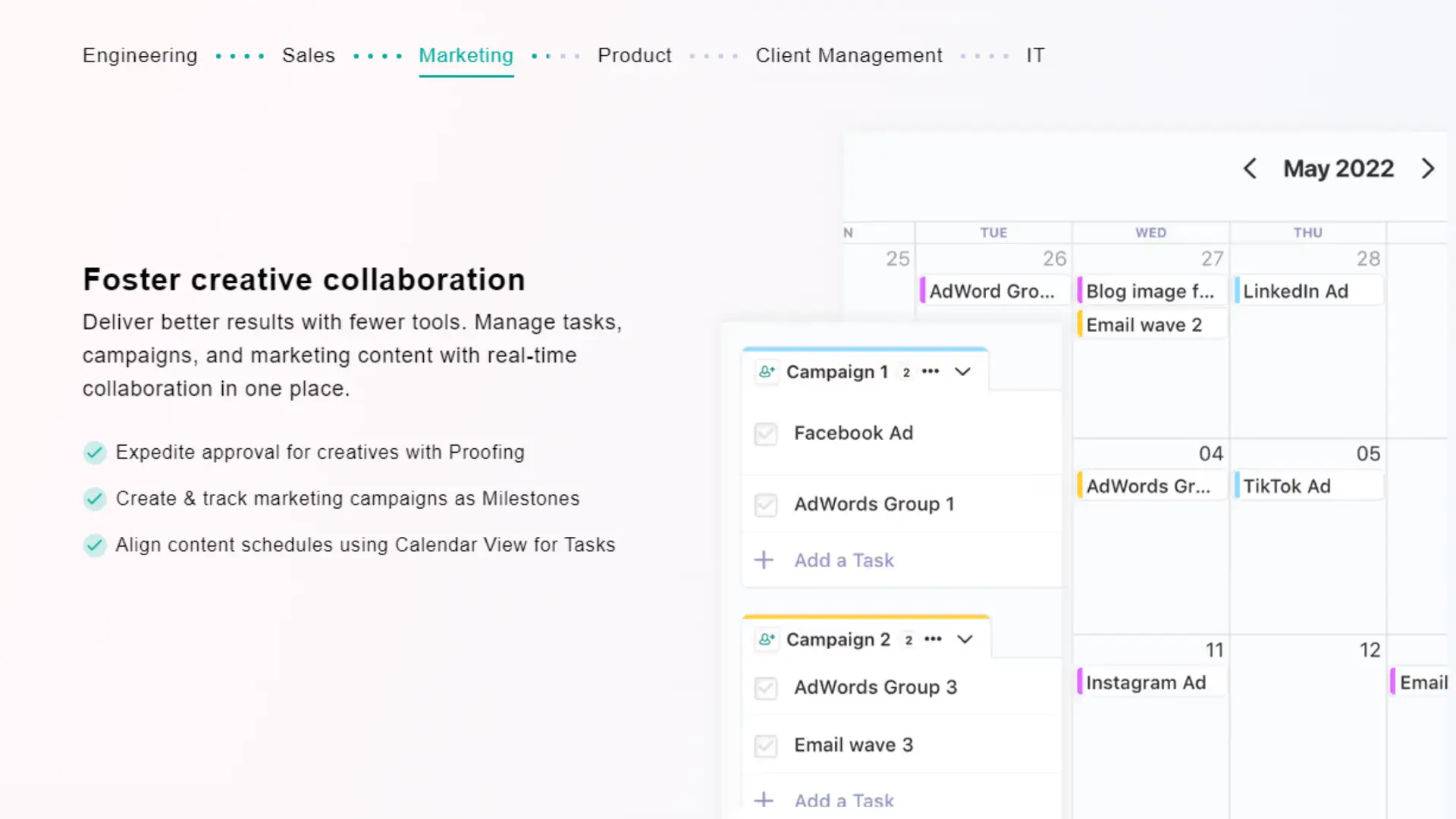
Employing a calendar for milestone tracking can enhance clarity. You should establish deadlines for each milestone, making it easier to monitor progress. Consistently updating the status of each milestone will ensure that everyone is on the same page.
Portfolio Management
Effective portfolio management requires overseeing multiple project portfolios. Evaluate and prioritize projects to align with business objectives. This helps in resource allocation and risk management.
Creating a portfolio overview allows you to see the bigger picture. You can use tools such as Gantt charts to track progress across different projects. Keeping your portfolios organized minimizes conflicts and enhances productivity.
Productivity and Efficiency
Efficient workflows and productive team dynamics are crucial for success. The following details how Nifty enhances productivity through automation and collaboration tools.
Time-Saving Automations
Nifty offers a range of automations to help streamline your work. By automating recurring tasks, you can eliminate repetitive admin work. This feature ensures that project management is as efficient as possible.
For instance, you can set up automatic reminders and task assignments based on predefined rules. This automation reduces routine check-ins, giving your team more time to focus on important tasks. Integrations with tools like Google Calendar and Slack also help keep everything synchronized.
Real-Time Collaboration
Nifty’s real-time collaboration features allow teams to work together seamlessly. Changes and updates are visible instantly, ensuring everyone stays on the same page. This is particularly beneficial for remote teams.
The Mobile App provides access to project updates from anywhere, enhancing flexibility. You can edit documents, chat with team members, and manage tasks—all in real time. These tools foster an environment where collaboration and productivity thrive.
Security and Compliance
Nifty prioritizes protecting your data and adhering to regulatory standards. These commitments ensure your information remains secure and your operations maintain compliance.
Data Security Measures
Nifty employs robust data security measures to safeguard your information. Encryption is used both in transit and at rest to ensure unauthorized parties cannot access your data. The system also integrates with Microsoft Single Sign-On, providing a seamless yet secure way for you to manage user access.
Regular security audits are conducted to identify and mitigate potential vulnerabilities. Additionally, firewalls and intrusion detection systems are in place to monitor and protect against threats.
Compliance with Standards
Nifty is designed to comply with key regulatory standards essential for your organization. The platform adheres to GDPR and HIPAA guidelines, ensuring personal and sensitive information is handled with care. This compliance is crucial for legal case management, where data integrity and confidentiality are paramount.
Regular compliance reviews and updates are performed to align with evolving regulations. Nifty’s commitment to meeting these standards helps maintain your trust and promotes a culture of security.
Nifty | Pros & Cons
Nifty excels with its user-friendly interface, comprehensive features, and seamless integrations, making it an invaluable tool for efficient project management and team collaboration.
Pros
Cons
Nifty Review | Our Take
If you’re on the hunt for a project management tool that combines functionality with ease of use, look no further than Nifty. This all-in-one solution is designed to streamline your workflow, making it easier to keep your projects on track and your team in sync. From task tracking to time management, Nifty offers a comprehensive suite of features that cater to the needs of both small teams and large organizations. Its intuitive user interface ensures that even those new to project management tools can quickly get up to speed, making it a valuable addition to any team’s toolkit.
One of the standout features of Nifty is its seamless collaboration capabilities. With built-in chat, file sharing, and real-time updates, team members can effortlessly communicate and stay informed about project progress. This fosters a collaborative environment where everyone is on the same page, reducing the risk of miscommunication and ensuring that deadlines are met. Additionally, Nifty’s robust integrations with other popular productivity tools mean you can keep using the apps you love while enjoying the benefits of a unified project management platform.
When it comes to pricing, Nifty offers exceptional value. Its affordable plans are designed to accommodate teams of all sizes, providing access to a wealth of features without breaking the bank. Whether you’re a startup looking to manage your first project or an established company in need of a more efficient workflow, Nifty’s pricing structure makes it an accessible and cost-effective choice. Plus, with regular updates and new features being added, you can be confident that you’re getting a tool that evolves with your needs.
Finally, Nifty’s customer support is top-notch. The responsive and knowledgeable support team is always ready to assist, ensuring that any issues are resolved promptly and efficiently. This level of support is crucial for maintaining productivity and minimizing downtime, making Nifty not just a tool, but a reliable partner in your project management journey. So why wait? Give Nifty a try and experience how it can revolutionize the way you manage your projects.
Nifty Review | FAQs
What are the strengths of Nifty for project management?
Nifty excels in project management through its integrated approach, combining tasks, docs, chats, and timelines in one tool. Advanced project tracking and collaboration features help streamline workflows and enhance team productivity.
How does Nifty’s pricing structure work?
Nifty offers multiple pricing tiers to fit different needs, including a free plan with basic features. Paid plans provide advanced functions and scalability, with options for monthly or annual billing. Custom enterprise solutions are also available.
Can you explain the features of the Nifty app?
Nifty includes task management, milestone tracking, time tracking, and team collaboration tools. Automated workflow updates and customizable dashboards provide clarity and improve efficiency. Additionally, integration with popular tools like Google Drive and Slack enhances versatility.
What are the key differences between Nifty and other project management tools like Basecamp and Scoro?
Unlike Basecamp and Scoro, Nifty combines project management and team collaboration in one platform. It offers robust automation and customizable workflows, which provide a more flexible and comprehensive solution. Each tool has unique features, but Nifty’s unified approach sets it apart.
How user-friendly is the Nifty platform for new users?
Nifty is designed with an intuitive interface that simplifies onboarding. New users can quickly navigate through its features with minimal training. Built-in guides and tutorials also support a smoother transition for teams adopting the platform.
What kind of support does Nifty offer to its customers?
Nifty provides multiple support channels, including live chat, email support, and an extensive help center with articles and tutorials. Premium plans include priority support. Regular updates and community forums also help users get the most out of the platform.
Related Articles & Blog Posts
Email Marketing & Funnels for Beginners: Learn how to build an email list, nurture trust and create sustainable online income
Latest Blog Posts
Email Marketing & Funnels for Beginners: Learn how to build an email list, nurture trust and create sustainable online income

You probably think you feel stuck because you don’t know enough. I used to believe the same thing. When I first started

You’ve probably heard that building online income requires multiple income streams. Maybe you’ve seen people talking about affiliate marketing, blogging, YouTube,
